Search This Blog

Monday, April 16, 2012

SLA Part 5 - Subledger Accounting Methods

As we have seen in the Part 4 of SLA, the Application Accounting definition is used to decide two thingsa. When a specific event within Subledger example Payables or Receivables becomes eligible for Accounting
b. How the journal is constructed.


However, each Primary Ledger[ 11i equivalent of primary set of book] and also each secondary ledger should be able to generate Journals as per their respective legislator requirements for all the modules implemented. This is where "Subledger Accounting Method" [SLAM] comes into the play. If you recollect from previous article, Application Accounting Definition is connected to only one module like Payables or Receivables etc. However a Ledger[11i SOB equivalent] needs accounting entries to be processed across many modules. Hence SLAM provides an umbrella to join accounting entries from various modules so that they can be channelled through to Oracle General Ledger. In other words a SLAM is a collection of accounting definitions for various modules in Oracle Apps. A SLAM is then attached to the Ledger[11i equivalent of Set Of Books].

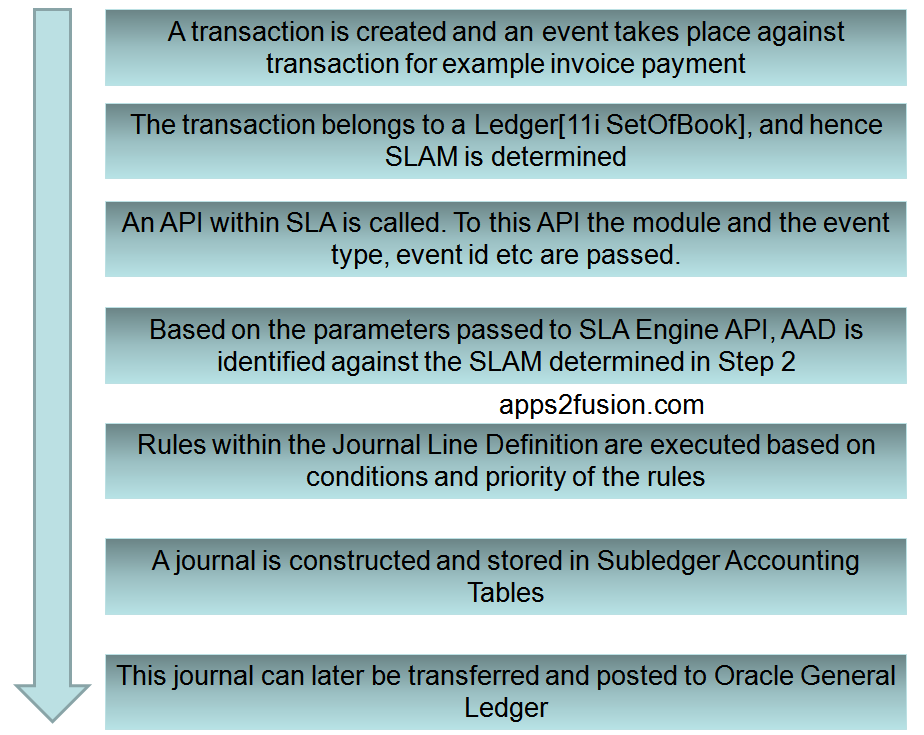
Therefore the flow of accounting entries appears as shown below


The flow represented in simple equation appears as below
Ledger Defined in GL-->SLAM-->AAD--> [Event Class and Event Type]-->Liability Lines-->[JED+JLT+ADR]
Ledger Defined in GL-->SLAM-->AAD--> [Event Class and Event Type]-->Expense Lines-->[JED+JLT+ADR]


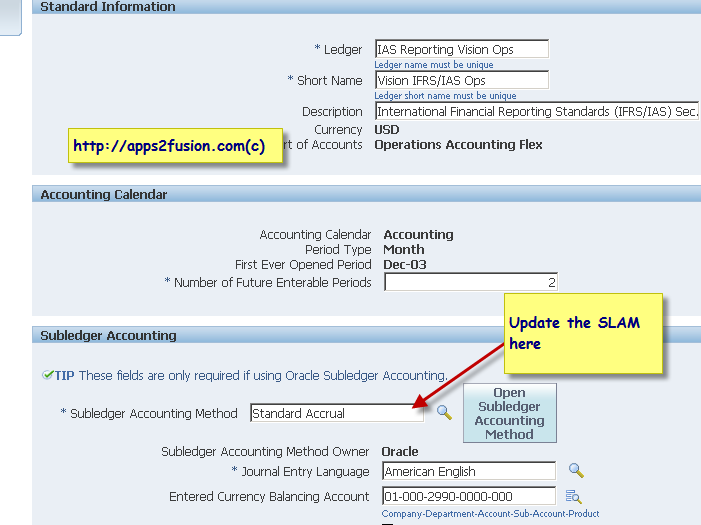
In order to assign the SLAM to a ledger, go to the General Ledger Super User responsibility and click on menu as shown below.


Click on update against the ledger


Attach the SLAM to this ledger


You can also modify the SLA accounting options using the two screenshots as shown below


SLA Part 4 - Application Accounting Definitions

In the SLA Part 2 article you Entities, Event Class and Event Types. In the SLA Part 3 you learnt the high level basics of Journal Line Definitions.
In this Part 4, you will see how the "Journal that gets constructed using Journal Line Definition" is associated with an underlying transaction in the respective module.


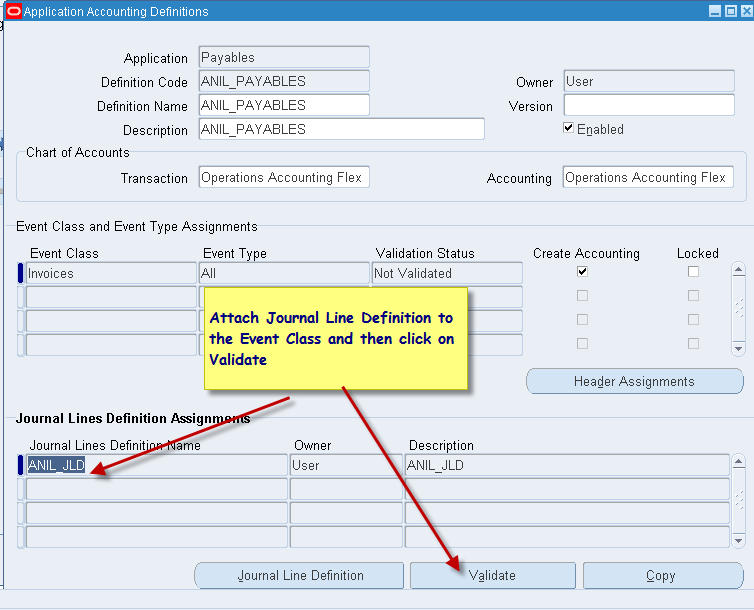
As seen in the image above, the Application Accounting Definitions [AAD] is attached to one or more Journal Line definition [JLD].

Effectively it means that AAD = JLD  for an Event Class+ Event Type combination = ADR+JED+JLT for an Event Class+ Event Type combination

As a thumb rule, you must remember that each Application Accounting Definition [AAD] belongs to a module. Therefore if you have one Ledger implemented [ 11i Set Of Books] and two modules implemented like AP and AR, then you will have 2 AAD's defined, i.e. one for Payables and another for Receivables.


In the above picture only one Event Class of Invoice is used in AAD. However in reality you will have more than one event classes like Invoices, Payments etc associated with a AAD for Payables module.

Seeded Application Accounting Definitions are provided for each module out of the box by Oracle. However if the existing definitions do not meet your business requirements, then you can copy the existing AAD's to a custom AAD, and then make alterations to the custom AAD, which means creating custom JLT, custom JED and custom ADR as appropriate. It is important to remember that you must create a custom copy of an existing SLA component before making modifications.

In the next article you will see Subledger Accounting Method.

SLA Part 3 - Journal Line Definition

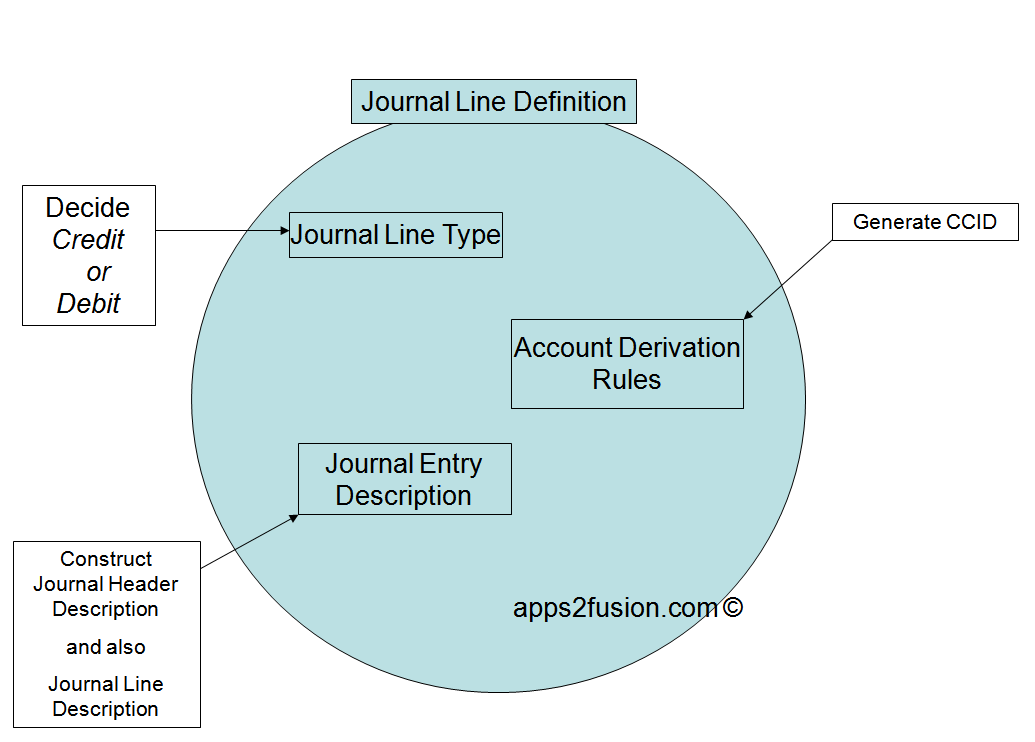
The  Journal Line Definition "defines" how the entire journal is built. To create any journal, one of the key things is to get the CCID or the code combination of segments. SLA needs to know where this CCID will be coming from.  You also need to know whether this CCID will be debit or this CCID will go into credit. Therefore you not just require the CCID, but you also need to decide whether a specific CCID will be debited or credited. In SLA, the "Journal Line Type" will specify whether the accounting entry is credit or debit. Also, you can then "attach something called an ADR to this Journal Line Type". The ADR returns the final code combination. Therefore Journal Line type will leverage the JLT+ADR to know which CCID is crediting and which CCID is debiting in the journal.


For each and every application there is a combination of event class and event type. Depending upon the combination of event class and event type the accounting gets triggered. The standard SLA out of the box from Oracle meets your requirement by 90%. For example you can fetch the standard accounting from payables or receivables options. However where these standard seeded accounting do not suffice, you can go and modify SLA to meet your business needs.

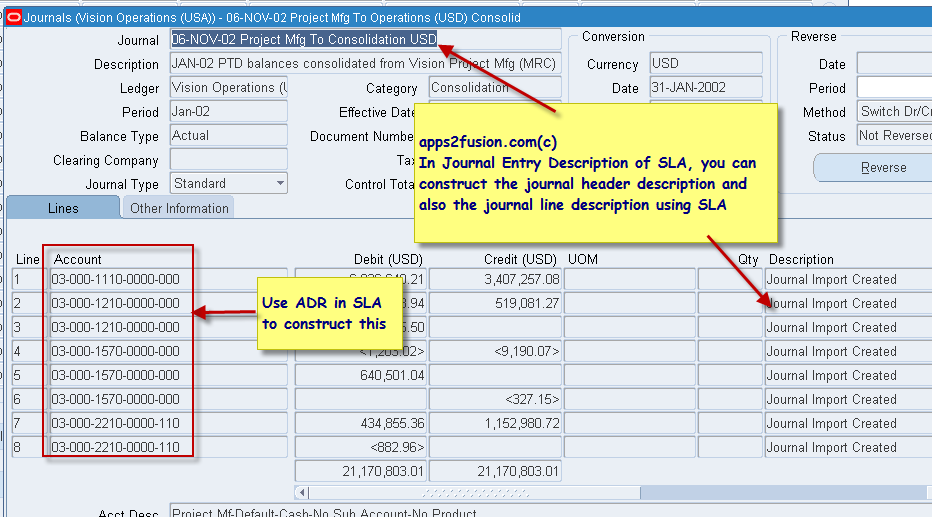
There is something called as Journal Entry Description. When a transaction is transferred as a journal, then every journal has credit/debit and description. The journal has description at header and also at line level. The JED allows you to generate the description of the Journal at both header and line level. For example you may want Customer Name or Customer Number in the journal description for a journal that is initiated from Oracle Receivables module. Using JED in SLA you can build header or line level descriptions.

The image below describes the end result journal that is produced by SLA


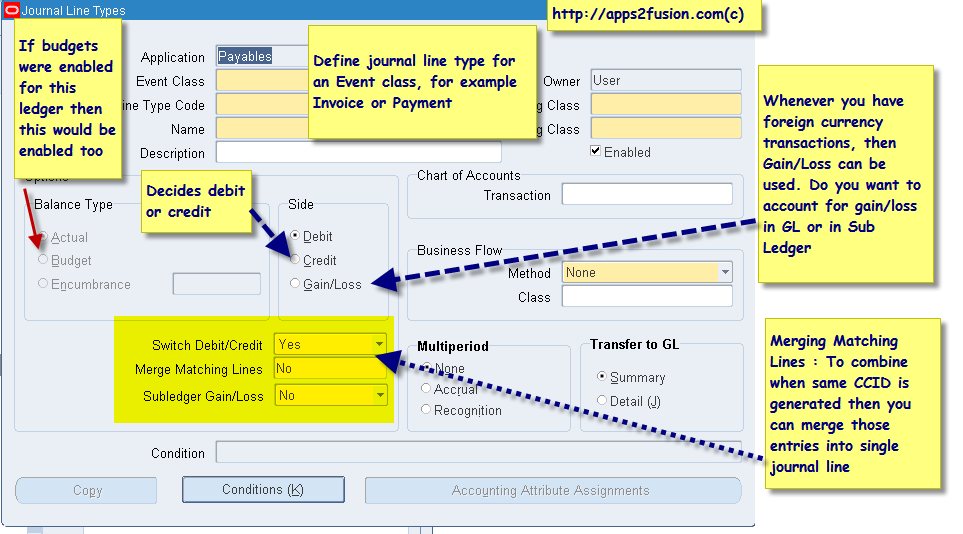
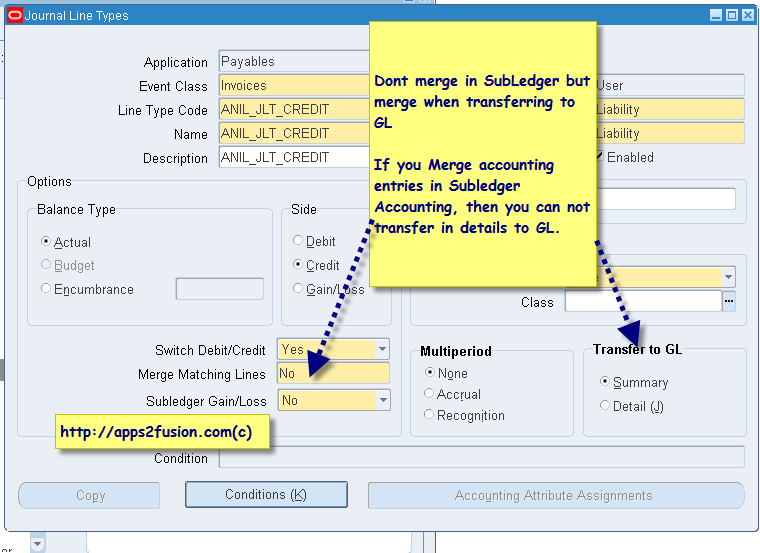
In JLT Journal Line Type, you can specify whether the entry is for credit or debit side. The Journal Line Type also provides options to do accounting for Gain/Loss of Foreign currency transactions. Further to that you can specify if SLA should merge the journal lines that have same CCID.


ADR - We specify how the account combination must be generated. We tell the system how we want the CCID should be built and transferred to the general ledger. You can either transfer the standard account as calculated within Subledger(AP or AR or PA etc) or the account generated from Subledger can be modified or replaced via ADR configuration within SLA.

Further to this, when defining ADR, you can specify the conditions under which a specific segment or CCID is returned. These conditions are like IF Conditions.


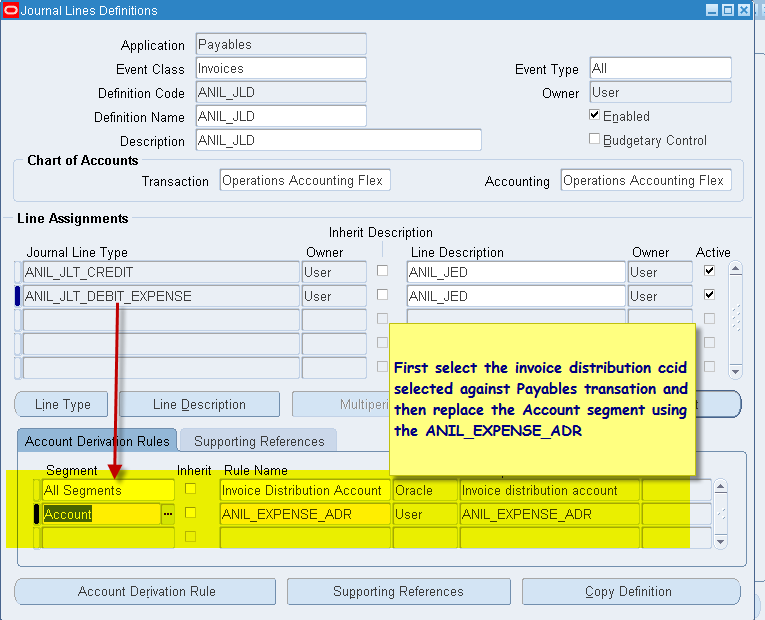
It is good to remember that the "Journal Line Definition=JED+JLT+ADR"


This is visible from the screenshot as shown below


You will notice that two "Journal Line Types" have been attached to this Journal Line Definition. The first journal line type assignment creates a credit line in the journal and the second journal line  type assignment creates a debit line in the journal.


By now you would have understood the significance of Journal Line Definition. However you might be wondering how this Journal Line Definition gets associated with a Subledger transaction. For example, how does Oracle E-Business Suite decide which specific Journal Line Definition should be used when a specific event takes place against an invoice in Oracle Payables. In other words, how will SLA decide how the Journal will be constructed when an invoice is validated within Payables. We will learn this via AAD in next part of the article using Application Accounting Definitions.

SLA Part 2 Entities - Event Class - Event Types

In this article you understand some of the basics fabrics/terminology used in SLA, i.e. Entities, Event Classes and Event Types. It is important for you to understand the variables within SLA engine which influence whether an accounting entry needs to be generated for a specific event within subledger like Payables or Receivables. For example in Procurement, there may be a need to generate accounting whenever a Purchase Order is encumbered. In case of SLA, the activity of "Encumbrance" against a Purchase Order is known as Event Type.
Likewise when a Payables Invoice is Validated, then you may want to create an accounting entry. In this case the "Invoice Validation" is an "Event Type". And your accounting rules for Invoice Validation will be attached against this specific "Event Type".

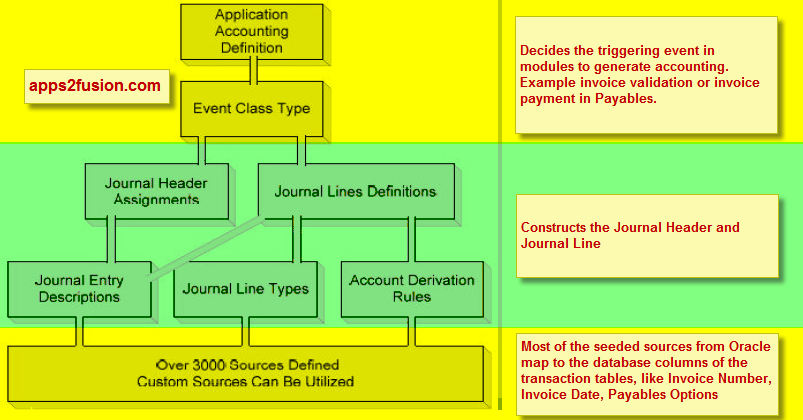
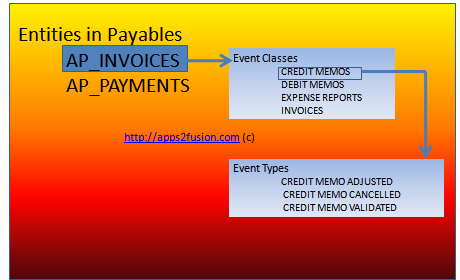
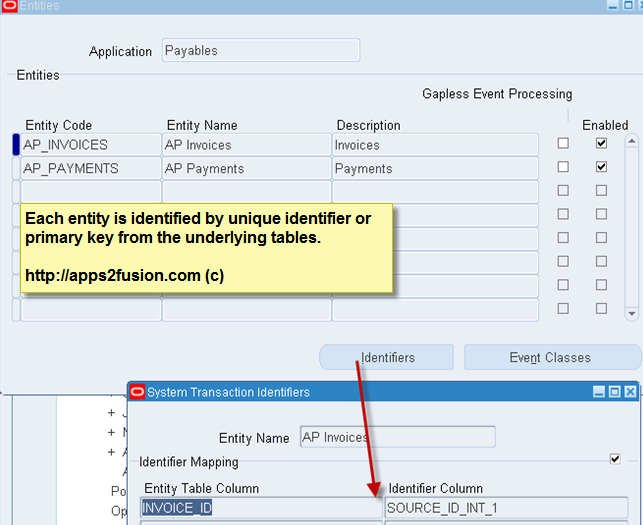
For Payables, an INVOICE transaction and a PAYMENT transactions are known as Entities within SLA.
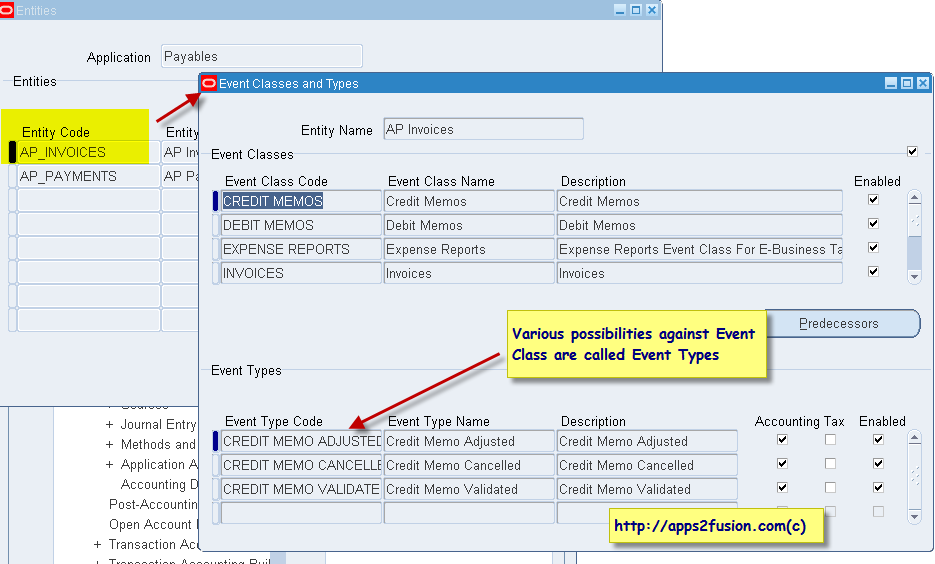
Entities can be subdivided into various "Event Classes", for example Credit Memo, Debit Memo, Expense Reports, Invoices etc.
Further to this, against the Event classes we define Event Types, for example, whenever your Invoice is validated or cancelled or adjusted, you may want some specific accounts in the General Ledger to be impacted. Event types are therefore the types/list of events against transactions which you wish to account for in General Ledger.

This is explained in the diagram below.


Each entity is identified by unique identifier or primary key from the underlying tables.

R12 SLA - Subledger Accounting Explained Part 1

from http://apps2fusion.com/at/58-pv/303-r12-sla-subledger-accounting

Please find first in the series of articles on R12 Subledger Accounting from Puneet Vishnoi.
 Puneet is a freelance consultant in Europe. Prior to freelancing, he was one of the key developers in Oracle Corporation for Oracle Projects Accounting and Oracle Grants Applications.
Puneet has designed numerous critical solutions in Oracle Applications R12 and 11i. He has vast experience in new R12 General Ledger Architecture. Puneet Vishnoi also happens to be an excellent troubleshooter, resolving various business critical issues when he was in Oracle Corporation.

This article is Part-1 of Subledger Accounting.

Why SLA and what does it do?
Oracle Sub Ledger accounting (SLA) is accounting hub in Oracle Application Release 12 (R12). It is used to derive all attributes required to account a transaction in Oracle General Ledger. In R12, SLA is used to derive the very basic accounting attributes like entered amount, accounted amount, Date, Currency code etc and the complex attributes like Ledger, Code Combination ID, Periods etc. After deriving these accounting attributes the transactions are then interfaced to GL from SLA. Thus in R12 no sub ledgers (AP, PO, PA etc) interfaces the transactions directly to GL, but all the transactions are interfaced to GL in following 2 steps:
1. Sub ledgers interface the data to SLA.
2. SLA derives the accounting information and interfaces the data to GL.

SLA gives the flexibility to manage the entire accounting rule at one place, which acts as a single source of truth for GL.

Note: There is no separate responsibility to access SLA setup or the view the transactions generated by SLA. Rather we can access SLA setup and review accounted transactions with extended menus attached to each sub ledger module.

Menu to access the SLA accounted transactions.


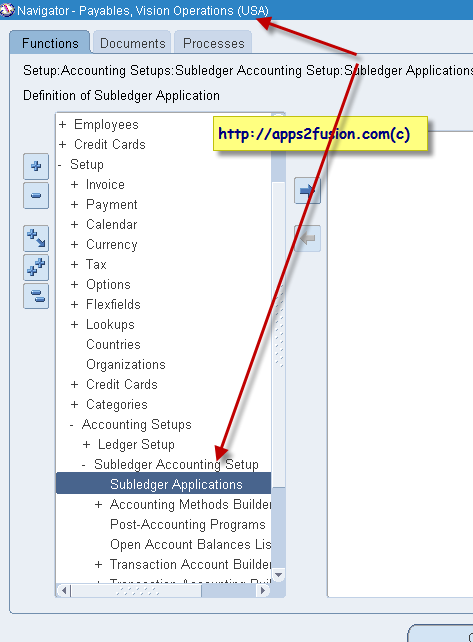
Menu to access the SLA Setup.


How does SLA works?
1. Register sub ledger transactions in SLA.
After validating / approving / costing the transaction in the respective module, the sub ledger calls SLA API to create a reference of the validated transaction in SLA. This reference is known as EVENT. Events are created by calling the public API “xla_events_pub_pkg.create_events” provided by SLA. It is up to the sub ledgers on how to call the API. For example Oracle Projects call this API from concurrent program “PRC: Generate Cost Accounting Events” and Oracle Payables calls this API while user creates accounting for the Invoice.

While calling xla_events_pub_pkg.create_events, oracle passes a unique id and event class (Will discuss in next step). Unique ID can be an invoice id or a po_distribution id or an expenditure_item_id etc. As soon as the sub ledger generates event in SLA, SLA returns unique event_id. This event_id will then act as a reference to all the accounting entries generated by the SLA. Once event is successfully created in SLA, means that the transaction is registered in SLA for accounting.

Taking the example of Oracle Projects in 11i where after costing the transaction user need to run the ‘PRC: Interface Cost to General Ledger’ followed by ‘Journal Import’ followed by ‘PRC: Tieback process’. But in R12 user only need to run “PRC: Generate Cost Accounting Events” which will register events in SLA and thereafter SLA will take care of accounting the transaction and interfacing it to GL. There is no tieback process in R12, as there is one to one reference of event id between SLA and sub ledger tables.


2. How does SLA understand whether unique id is invoice id or a po_distribution id or an expenditure_item_id as SLA uses same table to store all the identifier?
In step 1 we discussed that while creating the event we also need to pass event class. This event class is used to distinguish between the types of transaction passed for processing. To understand this better we will go thru the seeded oracle information.


Navigation:


Responsibility: Projects, Vision Services (USA)
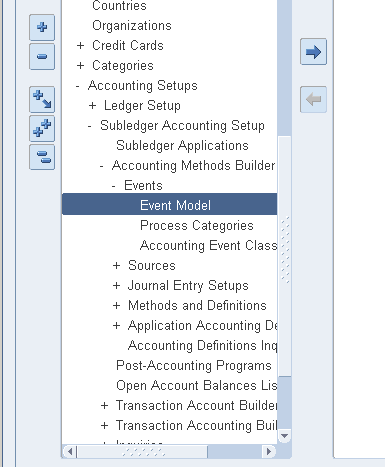
Menu: Setup > Subledger Accounting > Accounting Methods Builder > Events > Event Modal


This screen shows the hierarchical structure of different transactions that can be interfaced to SLA. Because the above screen shot is from Oracle Projects responsibility thus it shows only the projects related transactions. In the entity screen we see only those transactions that can be interfaced to the GL, that’s why we do not see Invoice as one of the entity as Invoices are not directly interfaced to GL from PA but they are routed thru AR.

Identifiers are the unique ID that is passed to SLA from sub ledgers. Per the screenshot Oracle is passing expenditure_Item_id for entity ‘EXPENDITURE’. “Identifier Column” field under Identifier window tells what column in SLA table should store expenditure_item_id. The identifier columns that can be used are SOURCE_ID_INT_1 to 4, SOURCE_ID_DATE_1 to 4, SOURCE_ID_CHAR_1 to 4 these values and columns are present in table XLA_TRANSACTION_ENTITIES.


Event Class window displays the different kind of expenditure transactions that can be interfaced to GL. This level of hierarchy is known as Event class, which is further classified into Event Types. In PA we have different event types like Labor Cost, Misc Cost, Usage Cost, Supplier Cost etc. Further we could classify Supplier Cost as Expense Report and Invoices as Oracle Projects can interfaces only these 2 transactions from AP.


3. Based on the identifiers and event class, how SLA creates accounting lines?
After registering the event in SLA, we can create accounting entries by running executable XDODTEXE. This executable is provided by SLA and is used by all the sub ledgers with different concurrent program names. Around 160 concurrent programs are uses the same executable for example in Projects it is used with name “PRC: Create Accounting”. This executable does the following:
a. Gather information from base tables in sub ledgers.
b. Derive the accounting attributes based on the data fetched from sub ledgers.
c. Derive code combination id based on the business rules.
d. Create journal lines based on the seeded Journal definition.
e. Create lines in XLA_AE_HEADERS and XLA_AE_LINES.

Sunday, March 18, 2012

Tax accrual at goods receipt

A recoverable tax is a tax that allows full or partial recovery of taxes paid on purchases, either as a recoverable payment or as an offset against taxes owed. For example, most VAT-type taxes allow for full recovery of taxes paid on goods and services that relate to taxable business supplies. In cases where an organization purchases both taxable and exempt supplies, the tax authority can designate a partial recovery rate to reflect the combination of taxable and exempt statuses.

Non-Recoverable Tax that record tax amounts on earned and unearned discounts and adjustments that you cannot claim as a deduction against tax liability.


Non recoverable Tax nothing but we don't recover anything from Paid Tax Amount, Ex: Sales Tax and VAT on Expense and Fixed Assets (In case of End Consumers)

Recoverable Tax nothing but we recover Some or Full of the Tax amount which we paid already. Ex: VAT on Inventory Items, Some Geography or Product Exemptions or Rebates

Most of the Cases the Company's have Sales tax and VAT,

For Sales Tax, The company doesn't recover any amount and Treats all amount as Expense...so for this Tax Rates define is enough and no need to setup Recoverable Tax Rates.

Ex: IF Sales Tax is 3%, we need to set up as follows.

Tax rate -> 3%....No need to define Recovery rates.

For VAT, The company Recovers Full (100%) amount for Inventory Items (Make the product and sell to Customers); and Don't Recover(0%) any amount for Expense items and Fixed Asset Purchases because the company is End Consumer for this,......so for this we need to Define Tax Rate and Recoverable Rates ( 0% and 100% separately).....we need to assign, for which Transactions or Accounts we are Recovering and not Recovering the amounts in Tax rules through Determining factors.

Ex: IF VAT IS 4%, we need to set up as follows.

Tax rate -> 4%
Recoverable Rate ->100%
Recoverable Rate ->0%

Based on our requirement we can define Various Tax Recovery rates Like 2%,5%,10%,.... (not only 0% and 100%).

Tax accrual at goods receipt
•
When goods are received, entries are created for received item cost (1) and tax (2).

•
When an invoice is received, entries are created for invoice value, including tax (3).

•
When an invoice is matched, entries are created for item cost (4), variance (5), tax on item cost (6), and tax on variance (7).

Tax accrual at supplier invoice
•
When goods are received, entries are created for received item cost (1) but not tax.

•
When an invoice is received, entries are created for invoice value, including tax (2).

•
When an invoice is matched, entries are created for item cost (3), variance (4), tax on item cost (5), and tax on variance (6).

Wednesday, March 7, 2012

Oracle ebusiness tax tables

Following are the main E-Business tax tables that will contain the setup information that will help support in troubleshooting E-Business tax information.

a. Tax Regimes: ZX_REGIMES_B
b. Taxes: ZX_TAXES_B
c. Tax Status: ZX_STATUS_B
d. Tax Rates: ZX_RATES_B
e. Tax Jurisdictions: ZX_JURISDICTIONS_B
f. Tax Rules: ZX_RULES_B

To get a dump of the eTax setups, you can use the following set of queries.
Please provide the tax regime code when prompted. If the issue is limited to a tax then provide the tax name when prompted else please leave it blank.

SELECT *
FROM zx_regimes_b
WHERE tax_regime_code = '&tax_regime_code';

SELECT *
FROM zx_taxes_b
WHERE DECODE('&tax_name',null,'xxx',tax) = nvl('&tax_name','xxx')
AND tax_regime_code = '&tax_regime_code';

SELECT *
FROM zx_status_b
WHERE tax = '&tax_name'
AND tax_regime_code = '&tax_regime_code';

SELECT *
FROM zx_rates_b
WHERE tax = '&tax_name'
AND tax_regime_code = '&tax_regime_code';

SELECT *
FROM zx_jurisdictions_b
WHERE DECODE('&tax_name',null,'xxx',tax) = nvl('&tax_name','xxx')
AND tax_regime_code = '&tax_regime_code';

SELECT *
FROM zx_rules_b
WHERE tax = '&tax_name'
AND tax_regime_code = '&tax_regime_code';

EBTAX TRANSACTION TABLES --

Following are the main E-Business tax tables that will contain the transaction information that will have the tax details after tax is calculated.

a. ZX_LINES: This table will have the tax lines for associated with PO/Release schedules.
TRX_ID: Transaction ID. This is linked to the
PO_HEADERS_ALL.PO_HEADER_ID
TRX_LINE_ID: Transaction Line ID. This is linked to the
PO_LINE_LOCATIONS_ALL.LINE_LOCATION_ID

b. ZX_REC_NREC_DIST: This table will have the tax distributions for associated with PO/Release distributions.
TRX_ID: Transaction ID. This is linked to the
PO_HEADERS_ALL.PO_HEADER_ID
TRX_LINE_ID: Transaction Line ID. This is linked to the
PO_LINE_LOCATIONS_ALL.LINE_LOCATION_ID
TRX_LINE_DIST_ID: Transaction Line Distribution ID. This is linked to the
PO_DISTRIBUTIONS_ALL.PO_DISTRIBUTION_ID
RECOVERABLE_FLAG: Recoverable Flag. If the distribution is recoverable then the flag will be set to Y and there will be values in the RECOVERY_TYPE_CODE and RECOVERY_RATE_CODE.

c. PO_REQ_DISTRIBUTIONS_ALL: This table will have the tax distributions for associated with Requisition distribution.

RECOVERABLE_TAX: Recoverable tax amount
NONRECOVERABLE_TAX: Non Recoverable tax amount

d. ZX_LINES_DET_FACTORS: This table holds all the information of the tax line transaction for both the requisitions as well as the purchase orders/releases.

TRX_ID: Transaction ID. This is linked to the
PO_REQUISITION_HEADERS_ALL.REQUISITION_HEADER_ID /
PO_HEADERS_ALL.PO_HEADER_ID
TRX_LINE_ID: Transaction Line ID. This is linked to the
PO_REQUISITION_LINES_ALL.REQUISITION_LINE_ID /
PO_LINE_LOCATIONS_ALL.LINE_LOCATION_ID

-- BELOW QUERY  RETRIEVES CUSTOMER ADDRESSES THAT DOESNT HAVE ANY GEOGRAPHY REFERENCE --

SELECT    HCA.ACCOUNT_NUMBER
              ,HCA.ACCOUNT_NAME
              ,HCS_SHIP.SITE_USE_CODE
              ,HL_SHIP.ADDRESS1 ADDRESS
              ,HL_SHIP.STATE STATE
              ,HL_SHIP.COUNTY COUNTY
              ,HL_SHIP.CITY CITY
              ,HL_SHIP.POSTAL_CODE
          FROM  HZ_CUST_SITE_USES_ALL HCS_SHIP
              , HZ_CUST_ACCT_SITES_ALL HCA_SHIP
              , HZ_CUST_ACCOUNTS HCA
              , HZ_PARTY_SITES HPS_SHIP
              , HZ_LOCATIONS HL_SHIP
         WHERE HCA.CUST_ACCOUNT_ID=HCA_SHIP.CUST_ACCOUNT_ID(+)
           AND HCS_SHIP.CUST_ACCT_SITE_ID(+) = HCA_SHIP.CUST_ACCT_SITE_ID
          -- AND HCA.ACCOUNT_NUMBER='10001'
           AND HCA_SHIP.PARTY_SITE_ID = HPS_SHIP.PARTY_SITE_ID
           AND HPS_SHIP.LOCATION_ID = HL_SHIP.LOCATION_ID
           AND HCA.STATUS='A'
           AND HCS_SHIP.STATUS='A'
           AND HCA_SHIP.STATUS='A'
           AND HL_SHIP.COUNTRY='US'
           AND NOT EXISTS (SELECT 1 FROM HZ_GEOGRAPHIES HG
                             WHERE HG.GEOGRAPHY_ELEMENT2_CODE=HL_SHIP.STATE
                                AND UPPER(HL_SHIP.COUNTY)=UPPER(HG.GEOGRAPHY_ELEMENT3_CODE)
                                AND UPPER(HL_SHIP.CITY)=UPPER(HG.GEOGRAPHY_ELEMENT4_CODE)
                                AND SYSDATE BETWEEN HG.START_DATE AND HG.END_DATE)

================================================================================================================

-- BELOW SQL QUERY RETRIEVES LIST OF JURISDICTIONS' FOR WHICH TAX RATES HAS BEEN DEFINED --

SELECT  TAX,
        TAX_JURISDICTION_CODE,
        GEOGRAPHY_ELEMENT2_CODE STATE_CODE,
        GEOGRAPHY_ELEMENT3_CODE COUNTY_CODE,
        GEOGRAPHY_ELEMENT4_CODE CITY_CODE
FROM ZX_JURISDICTIONS_B ZJ,
     HZ_GEOGRAPHIES HG
WHERE
    ZJ.TAX_REGIME_CODE='US_SALE_AND_USE_TAX'
    AND SYSDATE BETWEEN ZJ.EFFECTIVE_FROM AND NVL(ZJ.EFFECTIVE_TO,'31-DEC-4999')
    AND SYSDATE BETWEEN HG.START_DATE AND HG.END_DATE
    AND ZJ.ZONE_GEOGRAPHY_ID=HG.GEOGRAPHY_ID
    AND ZJ.TAX=HG.GEOGRAPHY_TYPE
    AND NOT EXISTS (SELECT 1 FROM ZX_RATES_B ZR
                    WHERE
                        ZR.TAX_REGIME_CODE='US_SALE_AND_USE_TAX'
                        AND ZR.TAX_JURISDICTION_CODE=ZJ.TAX_JURISDICTION_CODE)
ORDER BY TAX,
        TAX_JURISDICTION_CODE,
        GEOGRAPHY_ELEMENT2_CODE ,
        GEOGRAPHY_ELEMENT3_CODE,
        GEOGRAPHY_ELEMENT4_CODE
=====================================================================================================================

-- BELOW QUERY RETRIEVES LIST OF GEOGRAPHY'S WITHOUT JURISDICTIONS--

SELECT * FROM
(SELECT  GEOGRAPHY_TYPE,
        GEOGRAPHY_ELEMENT2_CODE STATE_CODE,
        GEOGRAPHY_ELEMENT3_CODE COUNTY_CODE,
        GEOGRAPHY_ELEMENT4_CODE CITY_CODE
    FROM
        HZ_GEOGRAPHIES HG
    WHERE HG.GEOGRAPHY_TYPE='STATE'
        AND SYSDATE BETWEEN HG.START_DATE AND HG.END_DATE
        AND GEOGRAPHY_ELEMENT1_CODE='US'
        AND NOT EXISTS (SELECT 1 FROM ZX_JURISDICTIONS_B ZJ
                        WHERE ZJ.ZONE_GEOGRAPHY_ID=HG.GEOGRAPHY_ID
                              AND ZJ.TAX_REGIME_CODE='US_SALE_AND_USE_TAX'
                              AND SYSDATE BETWEEN ZJ.EFFECTIVE_FROM AND NVL(ZJ.EFFECTIVE_TO,'31-DEC-4999')
                              AND ZJ.TAX=HG.GEOGRAPHY_TYPE)
UNION
SELECT  GEOGRAPHY_TYPE,
        GEOGRAPHY_ELEMENT2_CODE STATE_CODE,
        GEOGRAPHY_ELEMENT3_CODE COUNTY_CODE,
        GEOGRAPHY_ELEMENT4_CODE CITY_CODE
    FROM
        HZ_GEOGRAPHIES HG
    WHERE HG.GEOGRAPHY_TYPE='COUNTY'
        AND SYSDATE BETWEEN HG.START_DATE AND HG.END_DATE
        AND GEOGRAPHY_ELEMENT1_CODE='US'
        AND NOT EXISTS (SELECT 1 FROM ZX_JURISDICTIONS_B ZJ
                        WHERE ZJ.ZONE_GEOGRAPHY_ID=HG.GEOGRAPHY_ID
                                AND ZJ.TAX_REGIME_CODE='US_SALE_AND_USE_TAX'
                              AND SYSDATE BETWEEN ZJ.EFFECTIVE_FROM AND NVL(ZJ.EFFECTIVE_TO,'31-DEC-4999')
                              AND ZJ.TAX=HG.GEOGRAPHY_TYPE)
UNION
SELECT  GEOGRAPHY_TYPE,
        GEOGRAPHY_ELEMENT2_CODE STATE_CODE,
        GEOGRAPHY_ELEMENT3_CODE COUNTY_CODE,
        GEOGRAPHY_ELEMENT4_CODE CITY_CODE
    FROM
        HZ_GEOGRAPHIES HG
    WHERE HG.GEOGRAPHY_TYPE='CITY'
        AND SYSDATE BETWEEN HG.START_DATE AND HG.END_DATE
        AND GEOGRAPHY_ELEMENT1_CODE='US'
        AND NOT EXISTS (SELECT 1 FROM ZX_JURISDICTIONS_B ZJ
                        WHERE ZJ.ZONE_GEOGRAPHY_ID=HG.GEOGRAPHY_ID
                              AND ZJ.TAX_REGIME_CODE='_US_SALE_AND_USE_TAX'
                              AND SYSDATE BETWEEN ZJ.EFFECTIVE_FROM AND NVL(ZJ.EFFECTIVE_TO,'31-DEC-4999')
                              AND ZJ.TAX=HG.GEOGRAPHY_TYPE))
ORDER BY GEOGRAPHY_TYPE,STATE_CODE,
        COUNTY_CODE,
        CITY_CODE
===========================================================================================================

--SUPPLIER TAX REGISTRATION CREATION--

Use the below script to create Tax Registrations for suppliers - if you have defined any tax rule based on Tax Registrations

DECLARE X_RETURN_STATUS VARCHAR2(1);
BEGIN

     ZX_REGISTRATIONS_PKG.INSERT_ROW (       P_REQUEST_ID => NULL
                                            ,P_ATTRIBUTE1 => NULL
                                            ,P_ATTRIBUTE2 => NULL
                                            ,P_ATTRIBUTE3 => NULL
                                            ,P_ATTRIBUTE4 => NULL
                                            ,P_ATTRIBUTE5 => NULL
                                            ,P_ATTRIBUTE6 => NULL
                                            ,P_VALIDATION_RULE => NULL
                                            ,P_ROUNDING_RULE_CODE => 'UP'
                                            ,P_TAX_JURISDICTION_CODE => NULL
                                            ,P_SELF_ASSESS_FLAG => 'Y'
                                            ,P_REGISTRATION_STATUS_CODE => 'REGISTERED'
                                            ,P_REGISTRATION_SOURCE_CODE => 'IMPLICIT'
                                            ,P_REGISTRATION_REASON_CODE => NULL
                                            ,P_TAX => NULL
                                            ,P_TAX_REGIME_CODE => 'DAR'
                                            ,P_INCLUSIVE_TAX_FLAG => 'N'
                                            ,P_EFFECTIVE_FROM => TO_DATE('01-DEC-2007','DD-MON-YYYY')
                                            ,P_EFFECTIVE_TO => NULL
                                            ,P_REP_PARTY_TAX_NAME => NULL
                                            ,P_DEFAULT_REGISTRATION_FLAG => 'N'
                                            ,P_BANK_ACCOUNT_NUM => NULL
                                            ,P_RECORD_TYPE_CODE => NULL
                                            ,P_LEGAL_LOCATION_ID => NULL
                                            ,P_TAX_AUTHORITY_ID => NULL
                                            ,P_REP_TAX_AUTHORITY_ID => NULL
                                            ,P_COLL_TAX_AUTHORITY_ID => NULL
                                            ,P_REGISTRATION_TYPE_CODE => NULL
                                            ,P_REGISTRATION_NUMBER => NULL
                                            ,P_PARTY_TAX_PROFILE_ID => 812988
                                            ,P_LEGAL_REGISTRATION_ID => NULL
                                            ,P_BANK_ID => NULL
                                            ,P_BANK_BRANCH_ID => NULL
                                            ,P_ACCOUNT_SITE_ID => NULL
                                            ,P_ATTRIBUTE14 => NULL
                                            ,P_ATTRIBUTE15 => NULL
                                            ,P_ATTRIBUTE_CATEGORY => NULL
                                            ,P_PROGRAM_LOGIN_ID => NULL
                                            ,P_ACCOUNT_ID => NULL
                                            ,P_TAX_CLASSIFICATION_CODE => NULL
                                            ,P_ATTRIBUTE7 => NULL
                                            ,P_ATTRIBUTE8 => NULL
                                            ,P_ATTRIBUTE9 => NULL
                                            ,P_ATTRIBUTE10 => NULL
                                            ,P_ATTRIBUTE11 => NULL
                                            ,P_ATTRIBUTE12 => NULL
                                            ,P_ATTRIBUTE13 => NULL
                                            ,X_RETURN_STATUS => X_RETURN_STATUS
);

DBMS_OUTPUT.PUT_LINE('RETURN STATUS :' ||X_RETURN_STATUS);
COMMIT;
END;
===========================================================================================================

--EXCLUDE FREIGHT FROM DISCOUNT--

SELECT  APS.VENDOR_NAME,
             APS.EXCLUDE_FREIGHT_FROM_DISCOUNT VEND_EXCD,
            APSS.VENDOR_SITE_CODE,
            APSS.EXCLUDE_FREIGHT_FROM_DISCOUNT SITE_EXCD
 FROM   APPS.AP_SUPPLIERS APS,
            APPS.AP_SUPPLIER_SITES_ALL APSS
 WHERE    APS.VENDOR_ID = APSS.VENDOR_ID
        AND APS.VENDOR_ID NOT IN (1, 2, 3)
        AND APSS.EXCLUDE_FREIGHT_FROM_DISCOUNT IS NULL
        AND APS.EXCLUDE_FREIGHT_FROM_DISCOUNT  IS NULL